Cthun | Minecraft Skin — Minecraft skin by @OddSignalStudios
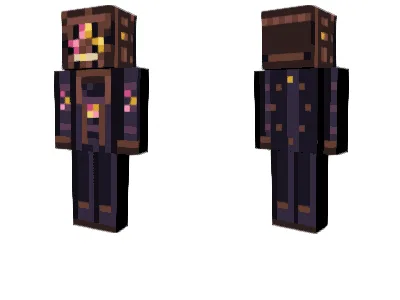
s Seen in Stephen King's Just After Sunset Something is trying to get through. Inspired by the terrifying entity Cthun, described in Stephen King's short story N. from the collection Just After Sunset, this Minecraft skin brings an unsettling piece of eldritch horror into your world. Cthun is an entity associated with Ackerman's Field, where the boundary between realities begins to weaken. Its monstrous appearance has been described in several disturbing forms, including a pulsing leather-like head, a flattened snake-like face, human-like teeth, and an unnatural three-lobed eye. This original pixel-art interpretation focuses on those unsettling details, featuring: A weathered, leather-like monstrous head A distinctive three-lobed eye with eerie yellow and pink coloring A flattened, snake-like face Human-like teeth Dark, otherworldly clothing and eldritch markings Skin Details Original 64×64 Minecraft skin Classic / Steve (Wide) model Compatible with Minecraft Java Edition Free download Installation instructions included Installation Download the PNG and import it through the Minecraft Launcher under Java Edition → Skins → New Skin. Select the Classic (Wide) model. Free Community Release This skin is free to download and enjoy. If you use it in your Minecraft world, videos, or streams, feel free to share your creations and tag Odd Signal Studio. Created by Odd Signal Studio Some doors should never be opened. Some boundaries should never be crossed. Disclaimer: This is an unofficial, fan-made Minecraft skin inspired by Stephen King's literary work. It is not affiliated with or endorsed by Stephen King or his publishers.
not rated yet · unisex · minecraft, minecraft skin, cthun, stephen king, just after sunset, n., eldritch horror, cosmic horror, horror skin, monster skin, free minecraft skin, odd signal studio
How to wear it
- Download the PNG on this page.
- Java: Minecraft Launcher → Skins → New skin → pick the file. Bedrock: Dressing Room → import.
- Choose Classic or Slim and save.
Want to change it? Open it in the free MC-ENGINE skin editor and make your own version.
More skins by @OddSignalStudios
- The Enfield Horror | Minecraft Skin
- The Tizheruk | Minecraft Skin
- The Squonk | Minecraft Skin
- The Snallygaster | Minecraft Skin
- Blue Sentinel | Amber Signal Expedition Crew
- Crimson Relay | Amber Signal Expedition Crew
- Polar Unit | Amber Signal Expedition Crew
- Violet Scout | Amber Signal Astronaut
Not an official Minecraft product. Not approved by or associated with Mojang or Microsoft.